Dieses Projekt ist nur auf Englisch verfügbar.
·Aug 2025 - Nov 2025· In cooperation withMercedes-Benz AG

What if the car designed its own UI for every drive, just for you?

A research-through-design exploration of an AI-native infotainment system that assembles its interface in real time from a validated component library, adapting to driving context, user state, and intent without compromising safety.

UX ResearchGenerative UIAgentic AIPrototypingUser Studies
Role
End-to-end · Design + Engineering
Methods
Interviews · Prototyping · Usability Testing · A/B study
Stack
React · Python · LLMs via APIs · Figma · ProtoPie · ElevenLabs
Timeline
4 months
01 — Context
Problem & Opportunity

Today's car interfaces are rigid by design.

In-car software today is built piece by piece, one use case at a time, slow to change and expensive to maintain. Generative UI replaces that with a single system: one library, many outputs.

 
Today
Built one piece at a time
With Generative UI
Built by the system, in real time
Shipping a new feature
Custom design and development for every use case.
Built at runtime from ready-made components. Same day.
Cost
Grows with each new use case. Every variant adds work to maintain.
One library covers all cases. Adding a new one costs almost nothing.
Personalisation
A few fixed personas. Set once at delivery, never updated.
Adapts to each driver and moment. Improves over time.
Regional and trim variants
Each market is built separately. Versions drift apart.
One model, many surfaces. Variants are generated, not built.
Edge cases
Often missed or left out, too expensive to design for individually.
Covered automatically by the same system.
Shipping a new feature
Today

Custom design and development for every use case.

With Generative UI

Built at runtime from ready-made components. Same day.

Cost
Today

Grows with each new use case. Every variant adds work to maintain.

With Generative UI

One library covers all cases. Adding a new one costs almost nothing.

Personalisation
Today

A few fixed personas. Set once at delivery, never updated.

With Generative UI

Adapts to each driver and moment. Improves over time.

Regional and trim variants
Today

Each market is built separately. Versions drift apart.

With Generative UI

One model, many surfaces. Variants are generated, not built.

Edge cases
Today

Often missed or left out, too expensive to design for individually.

With Generative UI

Covered automatically by the same system.

The Solution

An AI-native framework that assembles infotainment UIs in real time from pre-validated components, guided by context and bounded by safety.

02 — Example Scenarios
Same machinery, three drives

Watch the AI sense, reason, and assemble the UI.

Pick a driver. Hit Run. The car streams its sensor signals into the model, the model thinks out loud, and the cabin screen assembles itself from atomic components, each pulled from a validated library and placed in response to specific signals.

The same machinery handles all three. The combinations of signals produce genuinely different UIs. That's the point.

01SENSEContextual signals
20:34, low ambient lighttime
Heavy rain, trend ↑ next 15minweather
Fuel 12% · 47 km rangefuel
HRV elevated · last 8 minhrv
Irregular braking patterndrive
02REASONLLM thinking
Awaiting signals…
03ASSEMBLEAtomic library → cabin UI
STANDBY
STATUSNAVIGATIONCONTEXT
Hover a component to see which signals motivated it.
03 — Process Overview
Research-through-Design

Six steps from interview rooms to a working AI in a car.

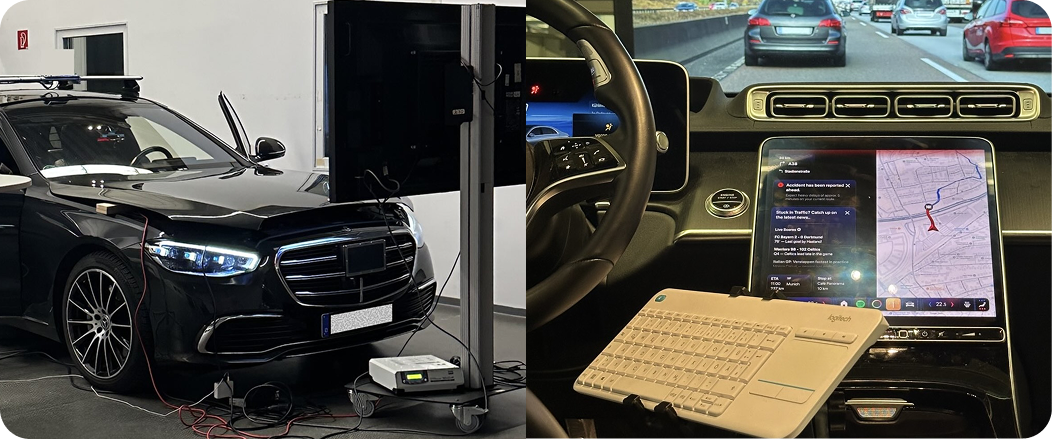
A research-through-design (RtD) approach grounded in human-centered principles, moving from problem framing, through prototyping and benchmarking, into a controlled in-car evaluation with 30 drivers.

STEP 01· n=7, semi-structured

Expert Interviews

Talked to UX, engineering, Driver Distraction, and HMI experts at Mercedes-Benz to understand their thoughts and pain points around current adaptive UI work. Findings were grouped using thematic clustering.

01Functions split across menu levels, causing frustration
02Existing adaptive features are deterministic / rule-based
03Industry actively moving toward use-case-less design
04Requries Balance: Too many constraints could produce results similar to rule-based systems.
05The need to respect user control and follow design system guidelines
06System must adhere safety guidelines
STEP 02· 4 models, 8 atomic UI elements

LLM Benchmarking

Evaluated different LLMs on latency and ability to generate / adapt UI from a fixed component library. Each model received the same 8 atomic UI elements and was asked to generate / adapt the interface. We measured latency, from voice prompt to rendered UI. Gemini 2.5 Pro hit the best balance between adaptivity and latency for the use case.

01Tested: Gemini 2.5 Pro · Opus-4 · GPT-5 · GPT-5 mini
02Gemini 2.5 Pro avg ≈ 14s, managable for controlled user study
03Reasoning models often >60s, too slow
STEP 03· 31 atomic UI elements

System Architecture

Conceptualised and finalised the architecture for the refined system. The LLM produces structured JSON; a deterministic renderer maps that to safe, brand-compliant components.

01Atomic, pre-designed UI library (31 elements)
02LLM splits screen between two regions by priority
03Output is JSON, never raw markup
STEP 04· n=4 designers

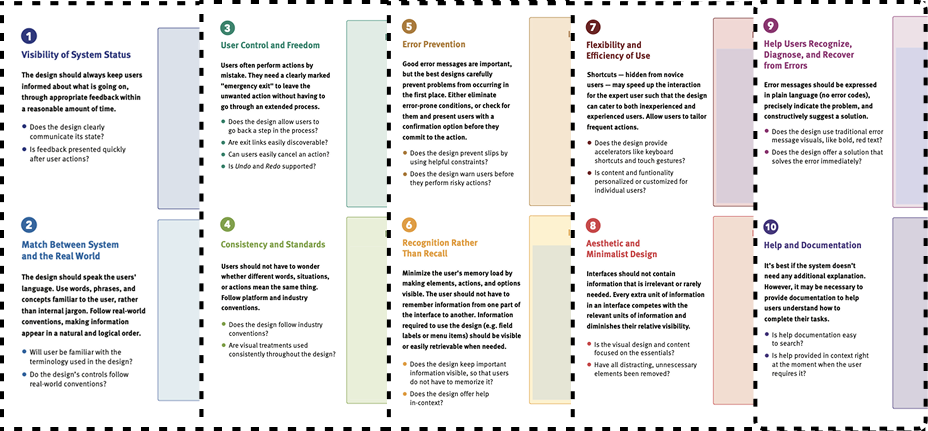
Heuristic Evaluation

Individual evaluation sessions with four designers using a workbook and a fixed task. Issues were rated 0–4 on severity. Issues rated 2, 3, and 4 were resolved before the user study.

Heuristic Evaluation artifact
0118 issues identified
0213 resolved (severity ≥ 2)
03Refined the prototype before the user study
STEP 05· n=30 · A/B in-car

User Study

AI-based system was compared against the pre-designed baseline using an A/B study. Both were integrated into the car's infotainment unit. Participants were split into four groups with randomised condition order to minimise ordering effects.

0118 M / 12 F · priori + sensitivity analysis
02Four randomised groups to control for order effects
03Two systems integrated into the same car
04Standardised tools: UEQ+, NASA TLX, custom Likert scales
STEP 06· Recommendations + insights

Synthesis

Quantitative analysis of the study data combined with qualitative insights to produce actionable design recommendations for constrained generative interfaces in safety-critical contexts.

01Statistical analysis (Wilcoxon signed-rank tests, descriptive statistics)
02Open-ended response coding and thematic analysis
03Preference point distribution analysis
04Design recommendations for generative UI systems
04 — System
Architecture

Three inputs, one model, one safe output.

The LLM is the gravity well. A bounded library, live context, and a constitutional system prompt all flow in. JSON flows out, gets validated, and only then becomes UI. Click any block for detail.

04.2 — Library
The atomic vocabulary

31 pre-designed elements. The only things the AI can use.

The LLM doesn't draw from scratch. It picks from this fixed set of brand-compliant, safety-validated components and fills them with contextual content. The structure of each element is locked; the AI controls which ones appear, where they go, and what data they carry.

HeadlineText
HeadlineText
SecondaryNumText
SecondaryNumText
SecondaryContinuousMultilineText
TertiaryContinuousDemiText
TertiaryContinuousLightText
TertiarySingleLineDemiText
PREVIEWReplace with screenshot
TertiarySingleLineLightText
SyncText
SyncText
Turn Right
Turn Left
Turn Around
Warning
Star
Flag
Leaves
Cloud
Calendar
Accident
Food
Gas Station
WiFi
Parking
WC
AppPanel (vertical content area)
Left side of the screen. Holds primary content like navigation, alerts, and lists.
ZeroLayerPanel (bottom bar)
Horizontal strip at the bottom. Shows glanceable summaries like fuel, weather, and media. Same visual treatment, different region.
VerticalStackSkeleton
A vertical container. The LLM fills it with text, icons, or lists and decides the order and spacing.
HorizontalStackSkeleton
A horizontal container. Used for side-by-side content like ETA + distance pairs or compact info blocks.
Navigation
Navigation
Primary turn instruction with distance, street, and directional icon.
AdditionalNavigation
ETA, remaining distance, and delay info in a compact row.
ListItemWithNoImage
ListItemWithNoImage
Numbered list row with title and description.
ListItemWithImage
ListItemWithImage
List row with a thumbnail (fetched via Pixabay API).
HorizontalList
HorizontalList
Scrollable card row for recommendations.
PREVIEWReplace with screenshot
Carousel
Swipeable content cards.
Divider
Divider
PREVIEWReplace with screenshot
Image (via Pixabay)
Dynamic image fetched by keyword.
PREVIEWReplace with screenshot
ActivityIndicator
Loading spinner shown while content is being generated.
05 — User Study
In-car evaluation

An A/B study against the pre-designed baseline.

Both systems were integrated into the same car's infotainment unit. Participants experienced both, in randomised order, to minimise ordering effects.

30
Participants
18 M · 12 F
2
Systems compared
AI · Pre-designed
9
Variables measured
Standardised + custom
100
Preference points
Distributed amongst A vs B
Hypotheses
H1

The AI-based UI performs as well as or better than the pre-designed GUI in usability (H1a), clarity (H1b), and informational value (H1c).

H2

The AI-based UI causes equal or lower cognitive load (H2a) and distraction (H2b), and equal or higher situational awareness (H2c) than the pre-designed UI.

Measurement tools
  • UEQ+Value · Clarity · Visual Aesthetics
  • NASA TLXMental load
  • Custom 7-pt LikertDistraction · Personalization · Adaptivity
  • UEQ-SOverall UX: Pragmatic + Hedonic
  • Open-endedQualitative feedback
06 — Outputs
Generated UIs from the user study

What the participants actually saw.

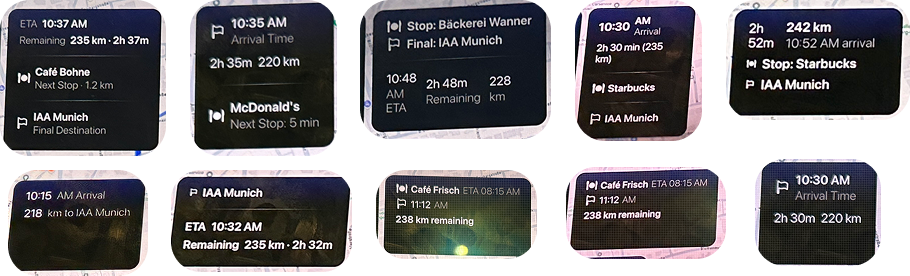
Participants were placed inside a continuous travel narrative: an early-morning drive from Böblingen to Munich for the IAA Mobility event. Within that drive, the session passed through three events designed to test three different interaction modes.

FURTHER OUTPUTS
06 — Results
What the data showed

The AI-assembled UI matched human-designed.

Across every measured variable, no statistically significant difference was found between the AI-assembled and pre-designed systems. Most participants didn't even notice a difference.

Overall preference · 100 points distributed
AI · 0.00 Ø Points
Pre-designed · 0.00 Ø Points
AI-ASSEMBLED
14 out of 30 people gave it > 50 points
4 of those 14 gave it > 70 points
PRE-DESIGNED
15 out of 30 people gave it > 50 points
5 of those 15 gave it > 70 points
UX & safety metrics: p-values (none significant)
Valuep = 0.872
Clarityp = 0.089
Distractionp = 0.146
Mental loadp = 0.235
Situational awarenessp = 0.310
Visual aestheticsp = 0.346
Personalizationp = 0.909
Contextual adaptivityp = 0.911
p < 0.05 = significant difference · all p > 0.05 here = no significant difference detected · supporting hypotheses H1 and H2
One caveat worth naming

High variance was observed when the AI was given the most freedom in component creation. The interface accommodated the necessary information but not always with consistent structure across generations. How that affects users in the long term is an open question for future research.

07 — Recommendations
What I'd tell a team building this

A hybrid strategy is the practical takeaway.

AI showed strong capabilities in assembling and generating UI on the fly. But high variation in the output can compromise trust and safety. The pragmatic answer is hybrid: designers retain control of critical components, while AI handles non-critical, supplementary information that benefits from being personalised.

Designer-controlled
Critical components
  • Navigation
  • Speed & alerts
  • Vehicle status
  • Predictable placement
AI-assembled
Supplementary, contextual
  • Recommendations
  • Comfort widgets
  • Contextual hints
  • Personalised content
Recommendation 01
Bound the AI design space
Don't let an AI freely generate elements or code. Generative reasoning should operate on a validated component library that complies with established design and safety guidelines, limiting interface states to a controlled space.
Recommendation 02
Preserve a stable spatial grammar
Even when interfaces adapt dynamically, certain spatial structures should remain stable to support glanceability and learnability. Restrict generative assembly to predefined regions.
Recommendation 03
Separate reasoning from rendering
LLM output should not be rendered directly. Producing structured configuration data interpreted by a deterministic rendering layer prevents malformed output and ensures only valid states reach the user.
Recommendation 04
Constrain agent autonomy through safety policies
In safety-critical domains, generative systems must operate under explicit constraints derived from domain guidelines. Embed these constraints in the system prompt and rendering logic.
08 — My role
End-to-end ownership

I drove this project from concept to working car.

The work spanned design, concept development, and implementation. I combined UX research and design with system architecture and development to turn the idea into a functioning, in-vehicle prototype evaluated with real drivers.

UX Research
  • Expert interviews (n=7)
  • Heuristic eval (n=4)
  • User study (n=30)
  • UEQ+, NASA TLX, custom
Concept & UX
  • System architecture
  • Atomic UI library (31)
  • Voice assistant flow
  • Design recommendations
Engineering
  • React frontend
  • Python LLM backend
  • Voice integration
  • In-car deployment
Eval & Synthesis
  • A/B study design
  • Statistical analysis
  • Open-ended coding
  • Final recommendations